
Best Time Tracking Software for Freelancers in 2026
27 May 2026 • Raddy
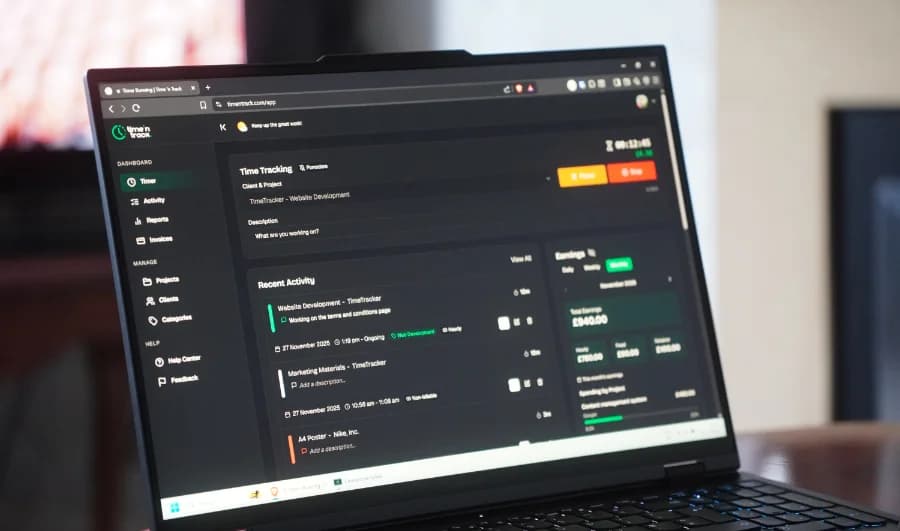
Picking the wrong time tracking tool costs more than the subscription fee. It costs you the minutes you spend wrestling with a clunky interface every day, the billable hours that slip through because logging felt like too much friction, and the revenue lost because you couldn't generate a clean invoice at the end of the month without exporting data into three other apps.
In 2026, freelancers have more options than ever — which makes the wrong choice easier to make, not harder. This roundup covers the best time tracking software for freelancers right now: what each tool is genuinely good at, where each falls short, and which type of freelancer is the best fit for each one.
No inflated ratings. No affiliate-padded scores. Just an honest assessment of seven tools worth considering.
What freelancers actually need from a time tracker
Before the list, it's worth being clear about what the freelance use case actually demands — because most time tracking tools are built for teams, and the mismatch creates friction.
What matters for freelancers:
- A timer you'll actually start and stop consistently (low friction = accurate data)
- Multi-client project structure — clean separation between clients, not a flat list of tasks
- Billable rate tracking per project or per client
- Reporting that maps hours to clients, not just to calendar blocks
- Invoicing, or a clean export path into your invoicing tool
- Pricing that makes sense for one person — not a per-seat model built for 50-person teams
What most freelancers don't need:
- Screenshot monitoring or activity tracking
- Attendance management or shift scheduling
- Manager approval workflows
- HR integrations
With that framing in place, here's how the leading tools stack up.
Quick comparison: best time tracking tools for freelancers 2026
| Tool | Free Plan | Paid From | Built-in Invoicing | Best For |
|---|---|---|---|---|
| Timentrack | 14-day trial | $9/mo | Yes | All-in-one for freelancers — time, invoicing, reports |
| Clockify | Yes (unlimited) | $5.49/seat/mo | Basic | Best free option; strongest multi-client reporting |
| Toggl Track | Yes (up to 5 users) | $9/user/mo | No | Privacy-first tracking; best browser extension |
| Harvest | Yes (2 projects) | $12/seat/mo | Yes | Calendar-style entry + clean invoicing |
| My Hours | Yes | $8/user/mo | Yes | Multi-rate billing across different clients |
| TimeCamp | Yes | $3.99/user/mo | No | Automatic capture for people who forget to track |
| FreshBooks | No | $17/mo | Yes (full accounting) | Freelancers who need accounting, not just invoicing |
The best time tracking software for freelancers in 2026
1. Timentrack — best all-in-one for freelancers
Timentrack was built specifically for freelancers and solo business owners — not adapted from a team tool. That distinction shows in almost every part of the product.
The core workflow is clean: you create projects per client, log time against them via a real-time timer or manual entry, and generate a professional invoice directly from your time log. No exporting. No copying hourly totals into a separate invoice tool. The whole flow happens in one place.
What it does well:
- Built-in invoicing that pulls directly from your time log — one of the few tools where you don't have to manually recreate your hours in a separate bill
- Per-client and per-project reporting with no setup required
- Timer, manual entry, and timesheet views — you can use whichever matches how you actually work
- Clean interface that doesn't require a learning curve
- Pricing that makes sense for solo freelancers: one flat rate, no tiered feature unlocking
Where it's limited:
- Doesn't have automatic background tracking (you need to start the timer manually)
- No native integrations with project management tools like Asana or Trello
- Smaller ecosystem than Toggl or Clockify — fewer third-party connections
Best for: Freelancers who want time tracking and invoicing in one place without paying for two subscriptions or managing two workflows. Particularly strong for those who invoice hourly and need to turn time logs into client bills quickly.
Pricing: 14-day free trial, no credit card required. Paid from $9/month, all features included.
2. Clockify — best free option
Clockify is the most generous free plan in the category by a wide margin. Unlimited projects, unlimited clients, unlimited time entries, unlimited users — all at no cost. The paid tiers add features like time rounding, custom export formats, and audit logs, but most solo freelancers will find the free plan covers everything they need.
What it does well:
- The free plan is genuinely useful, not a crippled trial
- Strong reporting — you can slice data by client, project, tag, or time period
- Works well across team sizes, from solo to agency
- Browser extension makes it easy to switch between clients mid-day
Where it's limited:
- Interface is functional but not especially refined — it feels like software built to be powerful rather than pleasant
- Invoicing on the free plan is limited; you'll need a paid tier or a separate tool
- The breadth of features can feel like overkill for a straightforward freelance workflow
Best for: Freelancers who want a capable free tool and don't need built-in invoicing. Also a strong choice for small agencies moving beyond a solo operation.
Pricing: Free forever plan. Paid from $5.49/seat/month.
3. Toggl Track — best for privacy-first freelancers
Toggl made a deliberate decision to not include screenshot monitoring, keystroke tracking, or activity surveillance — and they've been vocal about it. For freelancers who work with clients who might otherwise request monitoring, or who simply prefer not having that dynamic in any of their tools, Toggl is the obvious choice.
The browser extension is the best in the category. It integrates with dozens of tools — Notion, Asana, Trello, GitHub, Linear — so you can start a timer from wherever you're already working rather than switching tabs to log manually.
What it does well:
- Clean, minimal interface that gets out of your way
- Best-in-class browser extension for in-context time logging
- Genuinely privacy-focused — no monitoring features, by design
- Strong mobile app for logging on the go
- Solid reporting on paid plans
Where it's limited:
- No built-in invoicing — you'll need a separate tool like FreshBooks or a manual process
- The free plan is capped at 5 users (generous for teams, irrelevant for solo freelancers)
- Paid plan ($9/user/month) is competitive but not cheap for what solo freelancers get
Best for: Freelancers who value a clean, no-surveillance approach and who already have an invoicing tool in place (or are happy using a separate one).
Pricing: Free plan (up to 5 users). Paid from $9/user/month.
4. Harvest — best for calendar-style time entry
Harvest's weekly timesheet view — a calendar grid where you fill in hours by project and day — clicks for freelancers who prefer planning and logging time in blocks rather than using a running timer. It's a different mental model, and for some people it works far better.
Harvest also has solid native invoicing, and the connection between logged hours and generated invoices is clean. Where it falls down is the pricing relative to what you get: the free plan is limited to 1 user and just 2 projects, which most active freelancers will outgrow immediately.
What it does well:
- Weekly timesheet grid is intuitive for freelancers who work in focus blocks
- Clean, professional invoicing integrated directly with the time log
- Good integrations with Basecamp, Asana, Trello, and QuickBooks
- Strong reporting for project profitability
Where it's limited:
- Free plan is too limited for most freelancers (2 projects only)
- At $12/seat/month, it's one of the pricier options for a single user
- The interface hasn't changed much in several years — it's solid but not modern
Best for: Freelancers who prefer filling in weekly timesheets over real-time timers, and who want clean invoicing without a separate tool.
Pricing: Free (1 user, 2 projects). Paid from $12/seat/month.
5. My Hours — best for multi-rate billing
If you charge different rates to different clients — or different rates for different types of work within the same client — My Hours handles it more cleanly than almost anything else in the category.
You can set a billable rate per project, per task type, or per client, and the invoicing tool applies the correct rate automatically. For freelancers managing a varied client roster where one client pays $75/hour and another pays $120/hour for a different service, My Hours eliminates the mental overhead of tracking which rate applies where.
What it does well:
- Per-client and per-project billable rate setting
- Invoicing that applies rates automatically — no manual rate lookup when billing
- Clear per-client reporting
- Reasonable pricing for solo users
Where it's limited:
- Less polished interface than Toggl or Timentrack
- Smaller user base means fewer community resources and integrations
- The mobile app is functional but not as refined as desktop
Best for: Freelancers with varied rate cards across different clients or service types who need the billing to sort itself out automatically.
Pricing: Free plan available. Paid from $8/user/month.
6. TimeCamp — best for freelancers who forget to track
TimeCamp runs in the background, monitors which apps and websites are active, and can automatically assign time to projects based on rules you define. If your discipline with starting and stopping a timer is inconsistent, TimeCamp provides a safety net — a complete time log from your actual activity rather than reconstructed memory.
What it does well:
- Automatic time capture without manual start/stop
- Good for reconstructing where time actually went — useful for internal auditing
- Keyword-based auto-assignment to projects
Where it's limited:
- Background activity tracking is a privacy trade-off on your own machine
- Auto-assignment rules require setup time to work accurately
- Less useful if you switch between clients rapidly throughout the day
Best for: Freelancers who consistently lose track of time or forget to log, and who work mostly on one or two projects at a time.
Pricing: Free plan available. Paid from $3.99/user/month.
7. FreshBooks — best if you need full accounting
FreshBooks isn't primarily a time tracker — it's accounting software that includes time tracking as a feature. If you're at the point where you need proper double-entry accounting, expense categorisation, tax preparation support, and invoicing all in one place, FreshBooks does all of it. The time tracking module is solid; it's not the most refined experience, but it feeds directly into everything else the platform does.
What it does well:
- Full accounting suite: income, expenses, tax, invoicing, and time in one product
- Solid for freelancers who need to produce proper financial reports for accountants
- Recurring invoices and automatic payment reminders
Where it's limited:
- Significantly more expensive than dedicated time trackers ($17–$55/month)
- No free plan — you pay from day one
- If you only need time tracking and basic invoicing, it's more than you need
Best for: Established freelancers or small agencies who need accounting software and want time tracking bundled in, rather than freelancers who primarily need a time tracker.
Pricing: No free plan. Paid from $17/month.
How to choose: a decision framework
The right tool depends on which combination of features you'll actually use every day.
If you want everything in one place (time tracking + invoicing + client reports, no separate apps): start with Timentrack or Harvest.
If you want the best free option and don't mind handling invoicing separately: Clockify is the clear choice.
If you work across many tools (Notion, Asana, GitHub) and want time tracking that stays in context: Toggl Track's browser extension makes it the best integration choice.
If you charge different rates to different clients: My Hours handles this more cleanly than competitors.
If you keep forgetting to start your timer: TimeCamp's automatic capture is the fix.
If you're past the point of needing just a time tracker and need full accounting: FreshBooks is the right category for you.
One practical note: the best time tracker is the one you'll actually use consistently. A tool with every feature in the world that you abandon after two weeks is worth less than a simple one you stick with. Start with your biggest pain point — inconsistent logging, messy invoicing, no client reports — and pick the tool that solves that specifically.
FAQ
What is the best free time tracking software for freelancers? Clockify offers the strongest free plan — unlimited projects, clients, and time entries at no cost. Toggl Track also has a solid free tier for up to 5 users. If you want time tracking and invoicing in one place, Timentrack offers a 14-day free trial so you can test the full workflow before committing.
Do I need time tracking software if I charge flat project fees? Yes — internally, even if you never share the data with clients. Without tracking, you can't verify whether your fixed-price projects are actually profitable. Most freelancers who start tracking discover they've been undercharging, sometimes by 30–40% once actual hours are counted.
What's the difference between a time tracker and invoicing software? A time tracker records how long you spend on tasks and projects. Invoicing software generates bills you send to clients. Many freelancers use both separately, but tools like Timentrack and Harvest connect them so your time log feeds directly into your invoice — eliminating manual data transfer and the errors that come with it.
Is Toggl Track still good in 2026? Yes. Toggl remains one of the cleanest, most privacy-conscious time trackers available. It's particularly good for freelancers who want a reliable timer and solid reporting without screenshot monitoring or surveillance features. The browser extension is best-in-class for switching between projects.
How much should I spend on time tracking software as a freelancer? Most freelancers don't need to spend more than $9–$12/month. Tools in this range give you unlimited projects, client reporting, and invoicing. If your current tool costs more than that for a single user, you're likely paying for team features you'll never use.
Related reading:
- The ultimate guide to time tracking for freelancers
- 7 time tracking mistakes costing freelancers thousands
- How to track billable hours
Ready to track your time without the bloat? Timentrack connects your time log to your invoices, keeps clients separated cleanly, and works the way solo freelancers actually bill. 14-day free trial — no credit card required.

Written by
RaddyWeb developer, designer, and founder of TimeNTrack. With over 10 years of experience helping freelancers run better businesses, Raddy has worked with thousands of people through his Raddy Dev YouTube channel, his blog at raddy.dev, and ran a successful freelance business himself.