
Free Time Tracking Spreadsheet Template
Download our ready-to-use time tracking template for Excel and Google Sheets. Track billable hours, calculate earnings, and manage multiple projects—all in one simple spreadsheet.
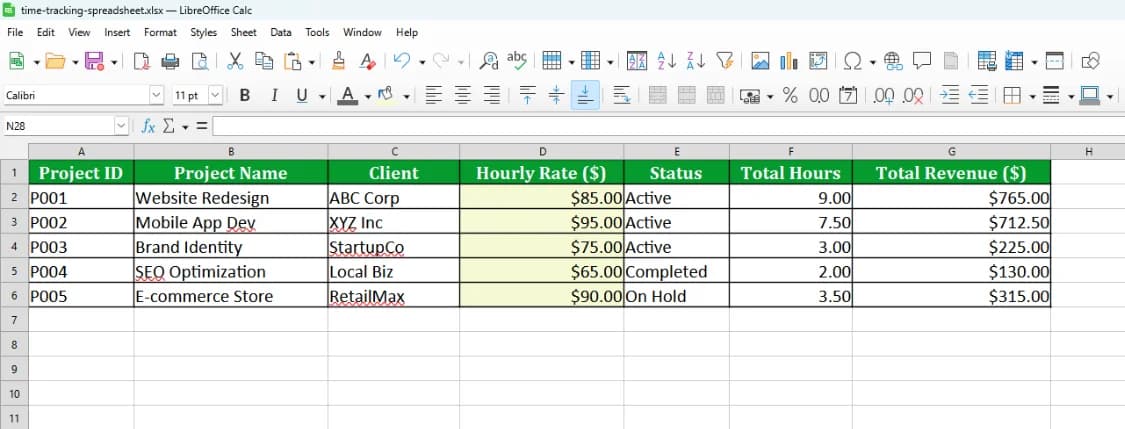
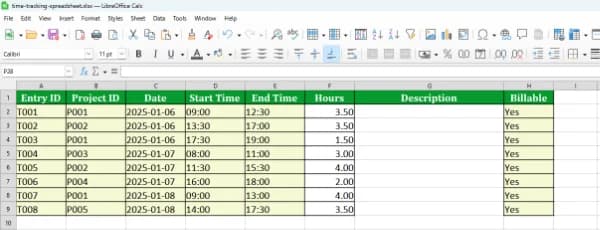
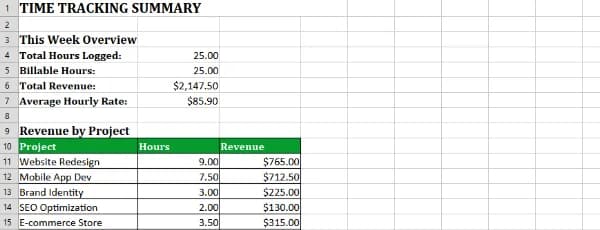
Download Your Free Template
Get instant access to our time tracking spreadsheet. Compatible with Excel 2016+ and Google Sheets. No email required.
File Format
.XLSX (Excel 2016+)
File Size
~18 KB
Compatible With
Excel, Google Sheets, LibreOffice
Need a simple way to track your work hours without paying for expensive software? Our free time tracking spreadsheet gives you everything you need in a familiar format.
Whether you're a freelancer tracking billable hours, a contractor managing multiple clients, or a business owner monitoring team productivity, this Excel time tracking template handles it all. It automatically calculates your earnings, tracks project time, and gives you weekly and monthly summaries.
The template works in both Microsoft Excel and Google Sheets, so you can use whatever you prefer. No macros, no complicated setup—just download and start tracking.
Perfect for: Freelancers, contractors, consultants, remote workers, and small business owners who need simple time tracking.
Everything You Need to Track Time
This isn't just a blank spreadsheet. It's a complete time tracking system with formulas, summaries, and reports built in.
Simple Time Entry
Log start time, end time, and breaks for each work session. The spreadsheet automatically calculates total hours worked.
Automatic Earnings Calculation
Set your hourly rate and watch your earnings calculate automatically. Perfect for freelancers tracking billable hours.
Multi-Project Tracking
Track time across multiple clients and projects. See exactly how much time you spend on each project.
Weekly & Monthly Summaries
Built-in summary views show your total hours and earnings by week and month. Great for invoicing and reporting.
Visual Reports
Charts and graphs help you visualize where your time goes. Identify your most profitable projects at a glance.
Easy to Customize
Add your own categories, adjust formulas, or modify the layout. It's your spreadsheet—make it work for you.
Why Use a Time Tracking Spreadsheet?
No Monthly Fees: Unlike time tracking apps that charge $10-30/month, a Google Sheets time tracking template is completely free forever.
Works Offline: Download the Excel time tracking template to your computer and use it anywhere, even without internet.
Own Your Data: Your time tracking data stays with you. Export it, back it up, or share it however you want.
Familiar Interface: If you know Excel or Google Sheets, you already know how to use this. No learning curve.
How to Use the Time Tracking Template
Get started in minutes. Here's how to set up and use your new time tracking spreadsheet.
Download the Template
Click the download button above to get the .xlsx file. Save it to your computer or upload it to Google Drive.
Set Your Hourly Rate
Open the spreadsheet and enter your hourly rate in the designated cell. This will be used to calculate your earnings automatically.
Add Your Projects/Clients
Fill in the project or client names in the project list. You can track time for up to 20 different projects.
Log Your Time
Each day, enter your start time, end time, break duration, and select the project. The hours and earnings will calculate automatically.
Review Your Summaries
Check the weekly and monthly summary tabs to see your total hours worked and earnings. Use these for invoicing or reporting.
Customize as Needed
Feel free to add columns, change colors, or modify formulas to match your workflow. Make it your own!
Pro Tips for Better Time Tracking
- Track time daily: Don't wait until the end of the week. Log your hours each day while they're fresh in your mind.
- Be consistent with project names: Use the same project/client names each time to ensure accurate summaries.
- Back up your file: Save a copy to cloud storage (Dropbox, Google Drive, OneDrive) so you never lose your data.
- Use it in Google Sheets: Upload the file to Google Sheets for automatic saving and access from any device.
Frequently Asked Questions
Everything you need to know about our free time tracking spreadsheet template.
Tired of Manual Data Entry?
Spreadsheets are great, but they don't track themselves.Time N Track runs in the background, generates invoices automatically, and gives you real-time insights without the manual work.
Time Saved vs. Spreadsheet
2.5 hrs
Saved per week